![Logotype-primary (1).png]](https://knowledgebase.getvim.com/hs-fs/hubfs/Knowledge%20Base/Logotype-primary%20(1).png?height=50&name=Logotype-primary%20(1).png)
Overview
The Clinical Data Exchange (CDE) application on the Vim platform enables secure extraction of encounter notes from the EHR. When used in conjunction with Care Insights, CDE supports end-to-end quality measure or diagnosis gap closure by ensuring that the correct clinical information is shared with payers and other authorized data sources. This exchange also facilitates payer-led audits and supports approved third-party analytics.
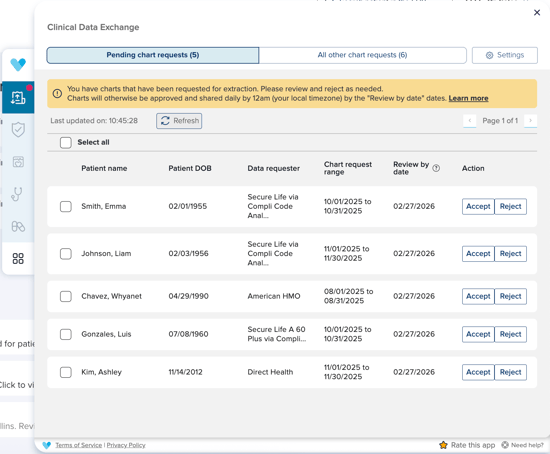
For end users within Vim, the CDE application runs quietly in the background but also provides an in-EHR interface where CDE Admins can easily view, review, and manage chart requests.
Key Features
- In-app notifications for new requests
- Designated CDE Admin that can manage chart requests via the CDE application in Vim
- Ability to assign CDE access to subset of users
- Transparent accept and rejection tools
- Auto-sharing at cutoff time unless rejected
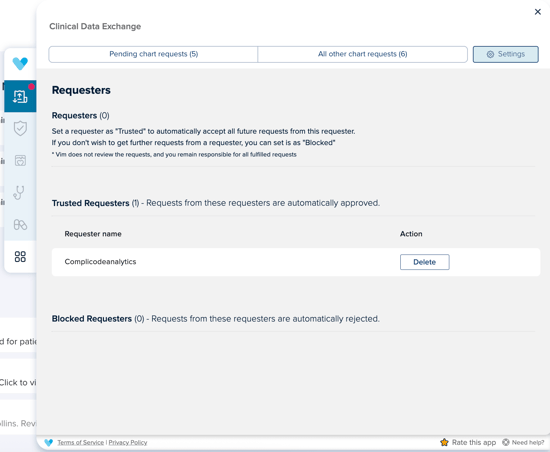
- Set up Trusted Requesters to automatically accept all future requests from known, reliable sources, removing the need for repeated manual reviews
Who Should Have Access to the CDE Application in Vim
Vim Connect Users
The Clinical Data Exchange (CDE) application should be enabled for all Vim users at the practice. This ensures the necessary EHR connectivity is in place if a chart request is received, as being live on Vim is required in order for the request to be fulfilled.
CDE Application Admin
This individual is responsible for managing chart requests through the CDE application. While this person may also serve as the Console Admin, they must have a Vim Connect user profile and log into the EHR regularly in order to access the CDE application and review chart requests within the app.
In addition to the visibility provided in the CDE app, the Admin will receive email notifications when there are open chart requests to review. If there are no open chart requests, no emails or push notifications will be sent.
If Care Insights generates chart requests that are completed daily, the practice’s CDE Admin will receive a regular email notification (no more than once per day).
Configuration Steps - Make CDE work best for your organization
Step 1: Update your Advanced Settings
Enable the Clinical Data Exchange (CDE) application at the organization level in Console.
Assign a CDE Admin. A single email address is required, this should belong to the primary CDE user (typically HIM or clinical operations staff).
How to update Advanced Settings:
- Log in to Vim Console
- Go to Account > Advanced Settings
- Toggle Enable Clinical Data Exchange and enter the Clinical Data Exchange Admin's email address for notifications.
- (Preferred) You can also choose to Activate Clinical Data Exchange for all users. If you select this you don't have to add the app to the Vim Connect User
- Click Save.
If you do not select add to all users, after enabling CDE in Advanced Settings, you must also add the application to specific Vim Connect Users:
- Go to Vim Connect Users
- Click the three vertical dots next to the user(s) who should have CDE access.
- Select Edit.
- In the Application section, add Clinical Data Exchange.
- Click Save.
Step 2: Update your CDE App Settings
Selecting Trusted and Blocked Requestors to Save Time
This step can only happen after your practice is live and there has been at least one chart request through CDE. Settings can only be configured by the CDE Admin, which is designated within the Advanced Settings.
CDE Admins can customize their chart review experience by automatically accepting or rejecting chart requests from specific requesters through the CDE Settings menu. This reduces noise, speeds up workflows, and ensures CDE Admins focus only on requests that require attention.
CDE Admins Can Change These Settings. Navigate to the CDE application on the Vim platform. Both options can be managed in CDE Settings by selecting Trust or Block for each Requester.
All requesters presented through CDE are vetted by Vim and have undergone a rigorous review and security approval process that meets strict compliance standards. However, each practice may have preferred vendors or wish to limit chart retrievals from certain sources.
By selecting a Trusted Requester, Vim will automatically enable chart retrievals from that vendor for your practice—removing the need for manual approval. This setting helps automate and streamline the review process.
- Trusted Requesters: CDE Admins can choose to automatically accept all future requests from a known, reliable requester. This eliminates the need to manually review similar requests repeatedly.
Example: A long-term vendor or payer with an established data-sharing agreement. - Blocked Requesters: CDE Admins can also choose to automatically reject future requests from a requester they consistently decline. This keeps the review queue focused and relevant.
Example: A vendor your practice does not work with or a source outside current payer contracts.