![Logotype-primary (1).png]](https://knowledgebase.getvim.com/hs-fs/hubfs/Knowledge%20Base/Logotype-primary%20(1).png?height=50&name=Logotype-primary%20(1).png)
This guide shows how to uninstall Vim Connect for users on a Windows device who installed Vim Connect through the MSI.
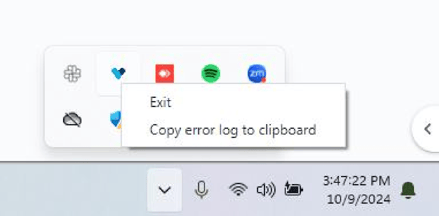
- In the taskbar on the bottom right of your screen, click on the up arrow to open your app tray and locate the Vim heart icon > Right click > Exit
- If you have the Vim Google Chrome extension installed, close all your Chrome windows.
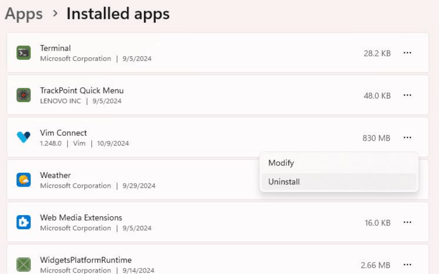
- Go to the Windows search bar again and type in Uninstall and click enter.
- Search for Vim Connect and click on the 3 dots > Uninstall.
- Open the file explorer > On the left hand side, go to: This PC > C: Drive > click into Program Files (the first one)
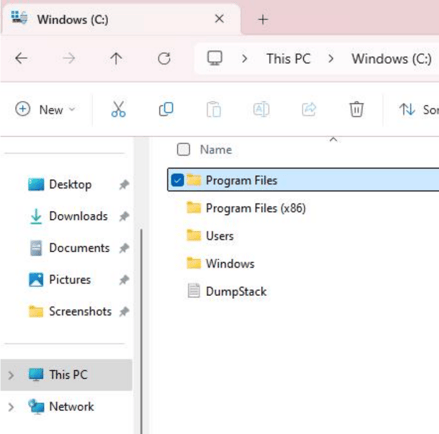
- Right click on the folder named "Vim Connect" and delete it
- In the Windows search bar type in %appdata% and click enter. This should open a folder window like this:
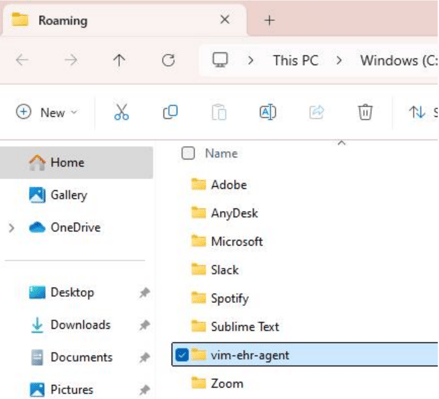
- Right click on the folder named "vim-ehr-agent" and delete it
- Once this completes Vim Connect should be complete uninstalled!