![Logotype-primary (1).png]](https://knowledgebase.getvim.com/hs-fs/hubfs/Knowledge%20Base/Logotype-primary%20(1).png?height=50&name=Logotype-primary%20(1).png)
How to Switch Views in Care Insights
For Vim Connect Users:
If you're logged into your EHR and using Vim Connect:
- Click the “Smaller View” icon in the top-right corner of the Care Insights application to switch from the default large view.
- Your preference will be saved and persist on your device.
- To return to the larger view, click the “Larger View” icon at any time.
See video below for a quick walkthrough.
For Console Admins:
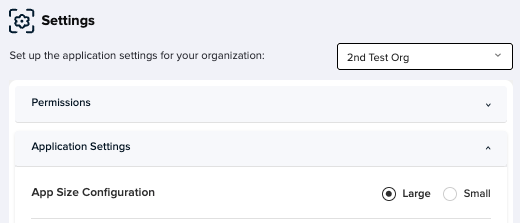
To set the default app size for your entire organization:
-
Log in to Console.
-
In the left-hand menu, click Applications.
-
Select Care Insights.
-
Click Settings.
-
In the Application Settings section, use the buttons to choose your organization’s default app size.