![Logotype-primary (1).png]](https://knowledgebase.getvim.com/hs-fs/hubfs/Knowledge%20Base/Logotype-primary%20(1).png?height=50&name=Logotype-primary%20(1).png)
As the admin user in your organization, you are able to manage your organization’s users through Vim Console.
Adding a User
-
Log in to Vim Console and go to the Users tab from the left-hand menu.
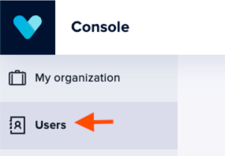
-
Click Add in the top right corner.
-
Enter the user's full information.
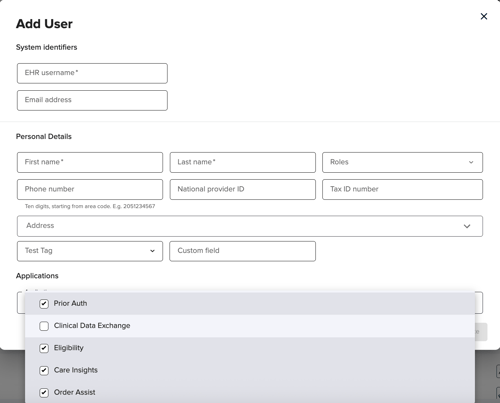
-
Click Submit to finish adding the user.
Please note:
- EHR username: In this field please specify the existing EHR username of the person you are adding as a user to Vim. This connection will help to automatically connect the user to their Vim account.
- Please make sure to add a correct email and phone number – these fields are critical when using a single sign-on login method, or when signing in using Vim credentials
- The address fields are meant for the place of business – the clinic address for example
- The Applications list may remain empty. If it is left empty, the new user will have access to all applications available for your organization. If you want to limit the access of this user to only a few of the applications, please specify which ones.