![Logotype-primary (1).png]](https://knowledgebase.getvim.com/hs-fs/hubfs/Knowledge%20Base/Logotype-primary%20(1).png?height=50&name=Logotype-primary%20(1).png)
Vim Connect users can now contact our support team directly within Vim Connect, eliminating the need for external emails and ensuring quicker issue resolution. This feature allows our team to efficiently gather key troubleshooting details, such as user information, device ID, practice name, and app context, without requiring manual input.
How to Report an Issue
1. Access the Support Tool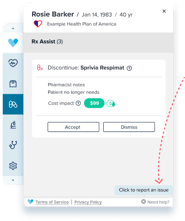
- While using any application in Vim Connect, click the “Need Help?” icon in the footer.
- A prompt will appear asking you to confirm that you'd like to report an issue to Vim Support.
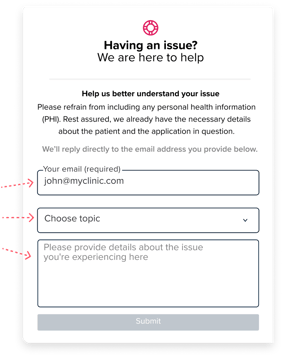
2. Complete the Form
- Your email will be autofilled.
- Select a category that best matches your issue.
- Add any additional context or details to help us understand the problem.
- Note: No need to enter your practice name, device ID, or Vim patient ID as these are captured automatically.
3. Submit Your Request
- Click Submit, and you’ll see a confirmation screen letting you know that your issue has been successfully reported.
- Our team will review your request and follow up via the email listed on the form.
Need Help with the Support Tool?
If you're unable to submit a request through Vim Connect, please email us at support@getvim.com for assistance.
Watch the In-App Support Tool Training Here: